AI Botnets: How Server Attacks Changed in 2025–2026.
AI Botnets: How Server Attacks Changed in 2025–2026.
 sysadmin
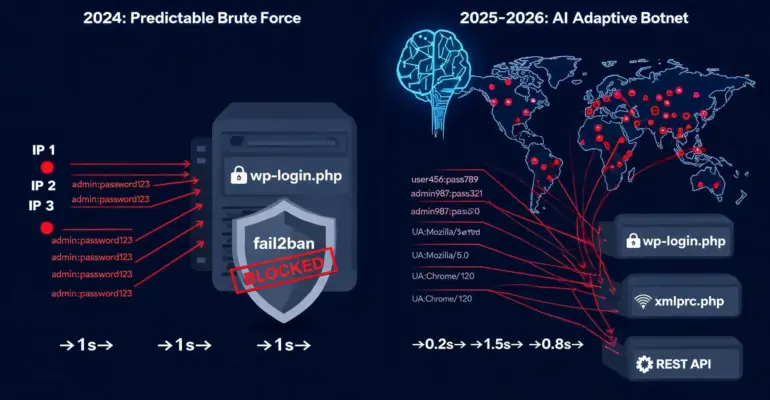
 In 2024, a typical WordPress attack looked like this: a handful of IP addresses hammering wp-login.php with the same user agent, the same password pattern, predictable intervals between requests. fail2ban banned them within a minute, nginx returned 429, the attack was over.
By the end of 2025, the picture changed. According to Cloudflare’s Bot Traffic Report 2026, 94% of all login attempts on WordPress sites come from bots. But these are no longer scripts cycling through a fixed password list. These are systems that learn from failures in real time: they rotate user agents after every block, vary request intervals to avoid rate limiting, and attack simultaneously through xmlrpc.php, wp-login.php, and the REST API — coordinated, from different points across the globe.
According to researchers, 35% of botnet operations in 2025 used machine learning algorithms to evade detection systems. This is no longer mass enumeration — this is adaptive attack.
HOW AN AI BOTNET WORKS
A classic botnet is an army of infected devices, each executing one instruction: hit this URL, with these parameters, at this frequency. The instruction comes from a C2 server (command and control), everything is predictable.
An AI botnet works differently. Each node doesn’t just execute an instruction — it analyzes the server’s response and decides what to do next. Got a 403? Rotate the user agent. Got a 429? Drop frequency by 40% and wait. Got a redirect? Follow it and try again. No response in three seconds? Switch to a different endpoint.
A real example: the RondoDox botnet, documented by The Hacker News in January 2026. The system went through three phases of evolution over nine months: manual scanning in March-April 2025 → mass daily probing of WordPress, Drupal, and IoT devices in April-June → hourly automated deployment from July through December 2025. In nine months the botnet learned to find vulnerabilities and exploit them faster than most teams can deploy a patch.
According to Patchstack’s 2026 report: the median time from public vulnerability disclosure to active exploitation is now 5 hours. Not days. Hours.
HOW AI BOTNETS DIFFER FROM TRADITIONAL ONES
Identity rotation
An old botnet used one IP until it got blocked. An AI botnet rotates IP addresses, user agents, request headers, and even TLS fingerprints on a learned schedule — so each request looks like a new browser from a new country.
Check your server for this kind of activity:
# Top user agents in the last 24 hours
grep "POST /wp-login.php" /var/log/nginx/access.log | \
  awk -F'"' '{print $6}' | sort | uniq -c | sort -rn | head -20

# Dozens of different realistic user agents from different IPs = AI botnet signature
Multi-vector coordination
Instead of hammering one endpoint — simultaneous attacks on multiple endpoints. While fail2ban bans an IP for hitting wp-login.php, another botnet node quietly tries passwords through xmlrpc.php from a different IP. Then switches to the REST API. The goal: find the unprotected entry point.
# See attacks across all WordPress endpoints simultaneously
# Output: IP address | request count | list of attacked endpoints
grep -E "wp-login|xmlrpc|wp-json" /var/log/nginx/access.log | \
  awk '{print $1, $7}' | sort | \
  awk '{count[$1]++; endpoints[$1]=endpoints[$1]" "$2} END {for(ip in count) if(count[ip]>5) print ip, count[ip], endpoints[ip]}' | \
  sort -k2 -rn | head -20
Example output:
185.220.101.42  23  /wp-login.php /xmlrpc.php /wp-login.php /xmlrpc.php
94.102.49.11    17  /wp-json/wp/v2/users /wp-login.php /xmlrpc.php
First line — IP alternating between wp-login.php and xmlrpc.php, classic multi-vector attack. Second line — started with reconnaissance through wp-json, then moved to brute force. If you see one IP hitting multiple endpoints — that’s not random.
ML password cracking
Tools like PassGAN — a neural network trained on 15.68 million passwords from the RockYou dataset — crack 50% of common passwords instantly. A 7-character password with mixed case, numbers, and symbols falls in under 6 minutes on a consumer GPU. Traditional dictionary brute force doesn’t come close to this speed.
Payload selection by victim profile
Advanced botnets identify the target type and choose the payload automatically: ransomware for corporate servers, data exfiltration for healthcare sites, cryptominer for weak VPS instances. According to SiliconAngle, some botnets determine the most profitable attack scenario before the main phase even begins.
WHAT THIS MEANS FOR AN ADMINISTRATOR
Old approaches work less well. Some concrete examples:
IP-based blocking — fail2ban bans an IP after N failed attempts. An AI botnet makes N-1 attempts from each IP and moves to the next. With 10,000 nodes and a fail2ban threshold of 5 attempts, the botnet can make 49,999 attempts before the first IP gets banned.
Rate limiting by IP — same problem. Limit of 10 requests per minute from one IP? The botnet uses 100 IPs and makes one request per minute from each. The limit never triggers.
User agent filtering — useless against botnets that rotate realistic user agents from real browsers.
What actually works in 2026:
HOW TO DEFEND
1. Behavioral analysis instead of IP blocking
Instead of “block IP after 5 failures” — analyze behavior patterns. One IP making one attempt at a time? Suspicious. A hundred IPs attacking simultaneously with exactly 60-second pauses? Too synchronized to be human.
Cloudflare Bot Management and Cloudflare WAF with managed rules do this automatically. For nginx without Cloudflare — combine subnet-level rate limiting with log analysis:
# Find /24 subnets with anomalous activity in the last hour
awk -v d="$(date -d '1 hour ago' '+%d/%b/%Y:%H:%M')" '$0 > d' \
  /var/log/nginx/access.log | \
  grep "POST /wp-login.php" | \
  awk '{print $1}' | \
  sed 's/\.[0-9]*$/\.0\/24/' | \
  sort | uniq -c | sort -rn | head -20
# If one subnet shows hundreds of requests — block it entirely in nftables
2. Challenge-based protection
Cloudflare Turnstile or CAPTCHA on wp-login.php — bots can’t pass the challenge without JavaScript and a real browser environment. This cuts off most simple bots. Advanced AI botnets use headless browsers, but that’s orders of magnitude more expensive for the attacker.
3. Close all vectors except one
If xmlrpc.php is closed, wp-json users endpoint is closed, only wp-login.php remains — this concentrates the attack at one point and simplifies monitoring. The smaller the attack surface, the easier it is to detect anomalies.
# Comprehensive nginx blocking
location = /xmlrpc.php {
    deny all;       # Block all requests — returns 403 Forbidden
    access_log off; # Don't write to log — don't pollute disk with bot requests
}

location ~* ^/wp-json/wp/v2/users {
    deny all;
    access_log off;
}

# limit_req_zone — rate limiting zone, declared in the http{} block
# $binary_remote_addr — key: client IP in binary format (4 bytes, saves memory)
# zone=wplogin:10m — zone name and memory size (10 MB ≈ 160,000 IP addresses)
# rate=1r/m — maximum 1 request per minute from one IP
limit_req_zone $binary_remote_addr zone=wplogin:10m rate=1r/m;

location = /wp-login.php {
    # burst=3 — allow a queue of up to 3 requests above the limit (for legitimate users)
    # nodelay — don't delay queued requests, immediately return 503 if limit exceeded
    limit_req zone=wplogin burst=3 nodelay;

    fastcgi_pass unix:/run/php/php8.3-fpm.sock; # Pass request to PHP-FPM via Unix socket
    include fastcgi_params;                      # Include standard FastCGI parameters
    fastcgi_param SCRIPT_FILENAME $document_root$fastcgi_script_name; # Path to PHP file
}
Important: limit_req_zone is declared in the http{} block in nginx.conf, not inside server{}. Placing it inside server{} will cause nginx to fail with “limit_req_zone” is not allowed here.
Test the config and reload:
nginx -t && systemctl reload nginx4. Real-time anomaly monitoring
AI botnets reveal themselves not through individual IP addresses but through patterns. Monitor not “how many requests from this IP” but “what does the traffic look like overall”:
# Number of unique IPs attacking wp-login in the last 5 minutes
awk -v d="$(date -d '5 minutes ago' '+%d/%b/%Y:%H:%M')" \
  '$0 > d && /POST \/wp-login.php/' /var/log/nginx/access.log | \
  awk '{print $1}' | sort -u | wc -l
# More than 20 unique IPs in 5 minutes = coordinated attack
5. Application Passwords and 2FA
Even if the botnet gets the correct username through wp-json — Application Passwords (WordPress 5.6+) and two-factor authentication make password brute force pointless. This is the cheapest protection with the highest impact.
6. nftables — blocking before nginx
nginx and PHP are already the end of the chain. By the time a request reaches wp-login.php, the server has already spent resources on a TCP connection, TLS handshake, and HTTP header parsing. nftables cuts traffic at the kernel level — before nginx, before PHP, before everything.
Block a specific IP manually:
nft add element inet filter blocklist { 185.220.101.42 }

# Verify it was added
nft list set inet filter blocklist
Block an entire subnet when a coordinated attack comes from it:
nft add element inet filter blocklist { 185.220.101.0/24 }Automate blocking based on nginx logs — a script that grabs top attacking subnets and adds them to nftables:
#!/bin/bash
# Find subnets with more than 50 requests to wp-login in the last hour
awk -v d="$(date -d '1 hour ago' '+%d/%b/%Y:%H:%M')" '$0 > d' \
  /var/log/nginx/access.log | \
  grep "POST /wp-login.php" | \
  awk '{print $1}' | \
  sed 's/\.[0-9]*$/\.0\/24/' | \
  sort | uniq -c | sort -rn | \
  awk '$1 > 50 {print $2}' | \
  while read -r subnet; do
    nft add element inet filter blocklist { $subnet }
    echo "Blocked: $subnet"
  done
Rate limiting at the nftables level — limit new TCP connections to ports 80 and 443 per IP. The correct approach uses a meter — a per-IP counter without pre-allocating memory for each address:
# Add inside the chain input{} section of nftables configuration
# Meter counts new connections per IP, drop when limit exceeded
tcp dport { 80, 443 } ct state new \
  meter http_limit { ip saddr limit rate over 20/second } drop
If you need to add offenders to a blocklist with automatic expiry. Note: limit rate without meter is a global rate limit on all traffic, not per-IP. For per-IP, use the meter from the block above. This variant is useful for general SYN flood protection:
# First declare a dynamic set with timeout in the table section:
# set blocklist {
#     type ipv4_addr
#     flags dynamic, timeout
#     timeout 1h
# }

# Then the rule in chain input{}:
tcp dport { 80, 443 } ct state new \
  limit rate over 20/second \
  add @blocklist { ip saddr } drop
The difference from nginx rate limiting is fundamental: nginx counts requests at the HTTP level — the connection is already established. nftables counts TCP SYN packets — the connection hasn’t opened yet. This means that during a DDoS attack with thousands of connections, nftables protects nginx from overload, not the other way around.
fail2ban with the nftables backend automates the whole process — after configuring a jail for wp-login.php it automatically adds IPs to an nftables set after the threshold is exceeded:
# Verify fail2ban is using nftables
fail2ban-client get sshd banaction
# Should show: nftables-multiport or nftables-allports

# WordPress jail status
fail2ban-client status nginx-wplogin
REAL NUMBERS 2025–2026
From publicly available reports:
- 94% of WordPress login attempts come from bots (Cloudflare Bot Traffic Report 2026)
- 35% of botnet operations used ML to evade detection in 2025
- Median time from vulnerability disclosure to exploitation: 5 hours (Patchstack 2026)
- 11,334 new vulnerabilities in the WordPress ecosystem in 2025, up 42% year-over-year (Patchstack 2026)
- 91% of vulnerabilities are in plugins, not WordPress core
The last number matters: updating plugins the day a patch ships is no longer a recommendation — it’s the minimum standard.
HOW TO TELL IT’S AN AI BOTNET AND NOT A REGULAR ONE
A regular botnet leaves crude traces: same user agent, same subnet, predictable intervals. An AI botnet looks different — and you can see it in the logs.
Sign 1: Diverse user agents hitting a single endpoint.
# How many unique user agents attacked wp-login in the last hour?
grep "POST /wp-login.php" /var/log/nginx/access.log | \
  awk -F'"' '{print $6}' | sort -u | wc -l
# Regular botnet: 1-3 unique UAs
# AI botnet: 20-50+ different realistic UAs
Sign 2: Attack traffic is distributed unevenly over time, but without obvious patterns.
# View request distribution by minute
grep "POST /wp-login.php" /var/log/nginx/access.log | \
  awk '{print $4}' | cut -d: -f1,2,3 | sort | uniq -c
# Regular botnet: even intervals (every second, every 5 seconds)
# AI botnet: irregular intervals mimicking human behavior
Sign 3: Attack hits multiple endpoints simultaneously from different IPs.
# Count unique IPs attacking different endpoints at the same time
grep -E "wp-login|xmlrpc|wp-json" /var/log/nginx/access.log | \
  awk '{print $1}' | sort -u | wc -l
# 50+ unique IPs hitting different endpoints = coordinated botnet
Sign 4: Request volume doesn’t trigger rate limiting, but the number of attacking IPs is clearly abnormal.
If you see all of this at once — it’s an AI botnet. Single IP blocking won’t help.
WHAT TO DO IF AN ATTACK IS ALREADY UNDERWAY
A step-by-step plan for when a site is already under attack and you need to act fast.
Step 1 — assess the scale:
# How many wp-login requests in the last 1000 log lines?
tail -n 1000 /var/log/nginx/access.log | grep -c "wp-login"

# Watch the live stream (Ctrl+C to exit):
tail -f /var/log/nginx/access.log | grep "wp-login"

# How many unique IPs in the last 10 minutes?
awk -v d="$(date -d '10 minutes ago' '+%d/%b/%Y:%H:%M')" \
  '$0 > d' /var/log/nginx/access.log | \
  grep "wp-login" | awk '{print $1}' | sort -u | wc -l
Step 2 — immediately enable Cloudflare Under Attack Mode if the site is behind Cloudflare:
In the dashboard: Security → Settings → Security Level → I’m Under Attack. Cloudflare adds a JS challenge for all visitors. Bots are filtered instantly; legitimate users pass through in 5 seconds.
Step 3 — block wp-login.php via nginx for everyone except your IP:
# Allow only your IP, block everything else via nginx temporarily
location = /wp-login.php {
    allow YOUR_IP;
    deny all;
}
nginx -t && systemctl reload nginxStep 4 — let fail2ban clean up the rest:
# Check what's already banned
fail2ban-client status nginx-wplogin

# Manually ban a subnet
fail2ban-client set nginx-wplogin banip 185.220.101.0/24
Step 5 — after stabilization, run a post-mortem: where did the attack come from, which endpoints were targeted, what did the defenses miss.
HOW TO SET UP ALERTS BEFORE THE SITE GOES DOWN
It’s better to detect an attack 10 minutes before a crash than after. A few approaches.
Simple alert via bash + systemd timer — triggers when unique attacking IPs exceed a threshold:
#!/bin/bash
# /usr/local/bin/check-wp-attack.sh
THRESHOLD=30
COUNT=$(awk -v d="$(date -d '5 minutes ago' '+%d/%b/%Y:%H:%M')" \
  '$0 > d && /POST \/wp-login.php/' /var/log/nginx/access.log | \
  awk '{print $1}' | sort -u | wc -l)

if [ "$COUNT" -gt "$THRESHOLD" ]; then
  echo "ALERT: $COUNT unique IPs attacking wp-login.php in last 5 min" | \
    mail -s "WordPress attack detected: $(hostname)" [email protected]
fi
Run via systemd timer every 5 minutes:
# /etc/systemd/system/wp-attack-check.service
[Unit]
Description=Check for WordPress brute force attack

[Service]
Type=oneshot
ExecStart=/usr/local/bin/check-wp-attack.sh
# /etc/systemd/system/wp-attack-check.timer
[Unit]
Description=Run WordPress attack check every 5 minutes
[Timer]
OnBootSec=5min
OnUnitActiveSec=5min
[Install]
WantedBy=timers.targetsystemctl enable --now wp-attack-check.timer
systemctl list-timers | grep wp-attackIf using Cloudflare — configure alerts under Security → Notifications → Under Attack Mode Activation and Custom Firewall Rules Triggered.
HONEYPOT AND GEO-BLOCKING
Honeypot — a trap for bots
The idea is simple: create a URL that no legitimate user ever requests, but that bots find during scanning. Any request to it is automatically a bot.
Create a honeypot endpoint in nginx:
location = /wp-admin/install.php {
    # A legitimate user never visits this on a live site
    # Any request = bot
    access_log /var/log/nginx/honeypot.log;
    return 403;
}

# Note: nginx location blocks do not match query strings.
# To block ?action=register, use if in the server{} context:
# if ($arg_action = "register") {
#     access_log /var/log/nginx/honeypot.log;
#     return 403;
# }
Automatically ban everyone who hits the honeypot via fail2ban:
# /etc/fail2ban/filter.d/nginx-honeypot.conf
[Definition]
failregex = ^<HOST> - - \[.*\] "(GET|POST) /(wp-admin/install\.php|wp-login\.php\?action=register).* HTTP/.*" \d+
ignoreregex =
# /etc/fail2ban/jail.d/nginx-honeypot.conf
[nginx-honeypot]
enabled = true
port = http,https
filter = nginx-honeypot
logpath = /var/log/nginx/honeypot.log
maxretry = 1
bantime = 604800 # 7 days
action = nftables-multiport[name=honeypot, port="80,443", protocol=tcp]One request — immediate 7-day ban. A legitimate user will never go there.
Geo-blocking via nftables
If the site serves a specific region — traffic from other regions can be cut at the kernel level. There’s no reason for a local Russian-language blog to accept connections from Brazil or Indonesia at 3 AM.
Via Cloudflare — simplest approach: Security → WAF → Tools → IP Access Rules → Block country.
Via nftables with IP lists from ipdeny.com:
# Download IP block list (e.g., China)
wget -q http://www.ipdeny.com/ipblocks/data/aggregated/cn-aggregated.zone \
  -O /etc/nftables/geo-block-cn.txt

# Create a set and add the rule
nft add set inet filter geo_block { type ipv4_addr\; flags interval\; }
nft add rule inet filter input ip saddr @geo_block drop

# Load IPs into the set
while read -r cidr; do
  nft add element inet filter geo_block { $cidr }
done < /etc/nftables/geo-block-cn.txt
Important: geo-blocking is a blunt instrument. It also blocks legitimate users from blocked regions. Use only when confident the site’s audience is geographically limited.
Why WordPress is the primary target for AI botnets
Not because WordPress is less secure than other CMS. Because of scale: according to W3Techs, more than 43% of all websites run on WordPress. One botnet with one ruleset attacks millions of potential targets simultaneously.
The math is straightforward: renting a botnet costs tens of dollars per day, while a compromised server with a good domain reputation sells on dark web markets for $500 to several thousand dollars. Attacking WordPress pays off quickly.
Second factor: predictable structure. Every WordPress site has the same endpoints — wp-login.php, xmlrpc.php, wp-json, wp-admin. A botnet knows exactly where to look without any prior reconnaissance.
WHERE THIS IS ALL HEADING
What’s happening now is just the beginning. Several trends are already visible and will keep accelerating.
Attacks without human involvement
Today AI botnets are still operated by people — someone launches a campaign, sets targets, analyzes results. The next step is fully autonomous systems that independently select targets, adapt tactics, and monetize access. Early signs are already there: RondoDox went from manual scanning to hourly automated deployment over nine months with no visible operator involvement.
AI versus AI
This is already happening. Cloudflare Bot Management, Wordfence, Imperva — all use machine learning to detect anomalies. Attackers know about these systems and train their bots to evade them specifically. An arms race emerges where both sides iterate faster than humans can analyze.
According to Darktrace’s State of AI Cybersecurity 2025 report, 78% of CISOs reported that AI-powered attacks are significantly impacting their organizations. At the same time, more than 60% said they feel adequately prepared to defend against these threats — a 15% increase from 2024. But insufficient AI knowledge and a shortage of skilled personnel remain the top barriers.
Blurring the line between bot and human
Headless browsers with AI can mimic human behavior — mouse movements, pauses between clicks, scrolling, realistic page reading time. A CAPTCHA that stopped 99% of bots in 2020 stops far fewer in 2026. Cloudflare Turnstile and similar systems have shifted from “prove you’re human” to behavioral analysis of the entire session — but attackers are adapting to that too.
What this means for administrators
The profession is changing. It used to be enough to set up rules — fail2ban bans, nftables blocks, sleep soundly. Now rules are static and attacks are dynamic. More time goes not into configuring defenses but into analyzing patterns, interpreting anomalies, understanding attacker logic.
Good news: defense tools are getting smarter too. Cloudflare, Wordfence Premium, Imunify360 — these are no longer just rules but adaptive systems. The administrator’s role is shifting from “write a rule” to “correctly configure and interpret what the AI defense finds.”
Bad news: the barrier to entry for attackers is dropping. Complex coordinated attacks used to require expertise and resources. Now it’s enough to rent a ready-made AI botnet as a service — such offerings already exist on dark web markets.
The internet is becoming a place where most traffic is generated by machines, attacking machines are defended by machines, and humans increasingly find themselves as operators and analysts — not executors of routine tasks.
CONCLUSION
AI botnets didn’t change the targets — wp-login.php, xmlrpc.php, REST API, unpatched plugins. They changed the speed and adaptability. What used to be blocked in a minute can now run silently for hours.
The good news: basic hygiene still works. Closed xmlrpc.php, closed wp-json users endpoint, rate limiting on wp-login.php, updated plugins, and 2FA — not a silver bullet, but enough to move a site out of the “easy target” category.
Bots attack everything in sight. The goal isn’t to become invulnerable — it’s to become difficult enough that the botnet moves on to the next site in the queue.

If you enjoyed the article, you can support the author.